NewmacOS shortcuts and Stage Manager options in 1.4
Every Space, right away.
Your Mac. Your Pace!
A quiet Mac app that takes the wait out of switching Spaces, and stays out of your way while it does.
Free · macOS 13+ · Apple Silicon & Intel · Notarized by Apple


 MaccelerateYour Spaces. At your pace.





 Maccelerate
Switch Spaces yourself: press ← → on your keyboard or click the arrows on the screen.Switch Spaces yourself: swipe across the screen or tap the arrows.
WHAT MACCELERATE DOES
Three ways Maccelerate
shortens the wait.
Skip the long slide
Pick Fast, Faster or Instant. macOS still switches your Spaces. It just gets there at your pace.
Your trackpad, too
Swipe between Spaces with the same gesture as always. It now moves at the pace you chose.
SpaceMaccelerate2Know where you landed
A quiet indicator shows the number of the Space you arrived in, then fades. You choose how long it stays.
LESS FRICTION. MORE CONTROL.
The little things. Finally right.
For the switches you make every day, and the small details that feel right when someone gets them right.
Cmd-Tab stays Cmd-Tab
macOS still picks the app. When it lives on another Space, you get there faster.
Stays on your Mac
No telemetry, no account. SIP stays enabled. Update checks are optional.
One click away
Switch left or right, open the overviews or jump to any Space from the menu bar.
Your time, back
A local count of accelerated actions and an estimate of the time saved, by action.

Mission Control, a little sooner
Mission Control and App Exposé open through your shortcuts, the menu bar or the trackpad.
Nothing to relearn
Works with the Spaces
you already have.
No window manager and no new workflow. Your Spaces, the apps on them and your shortcuts stay exactly as they are. Only the wait goes.
- No setup per app, no plugins
- Native macOS Spaces, SIP stays on
- Nothing changes in System Settings








INSIDE MACCELERATE
Feels like your Mac.
Works your way.
A few thoughtful settings. A little more control. Make yourself at home.
Choose your pace, decide which transitions to accelerate, and keep Maccelerate ready when you log in.
The app
One small window. Everything in reach.
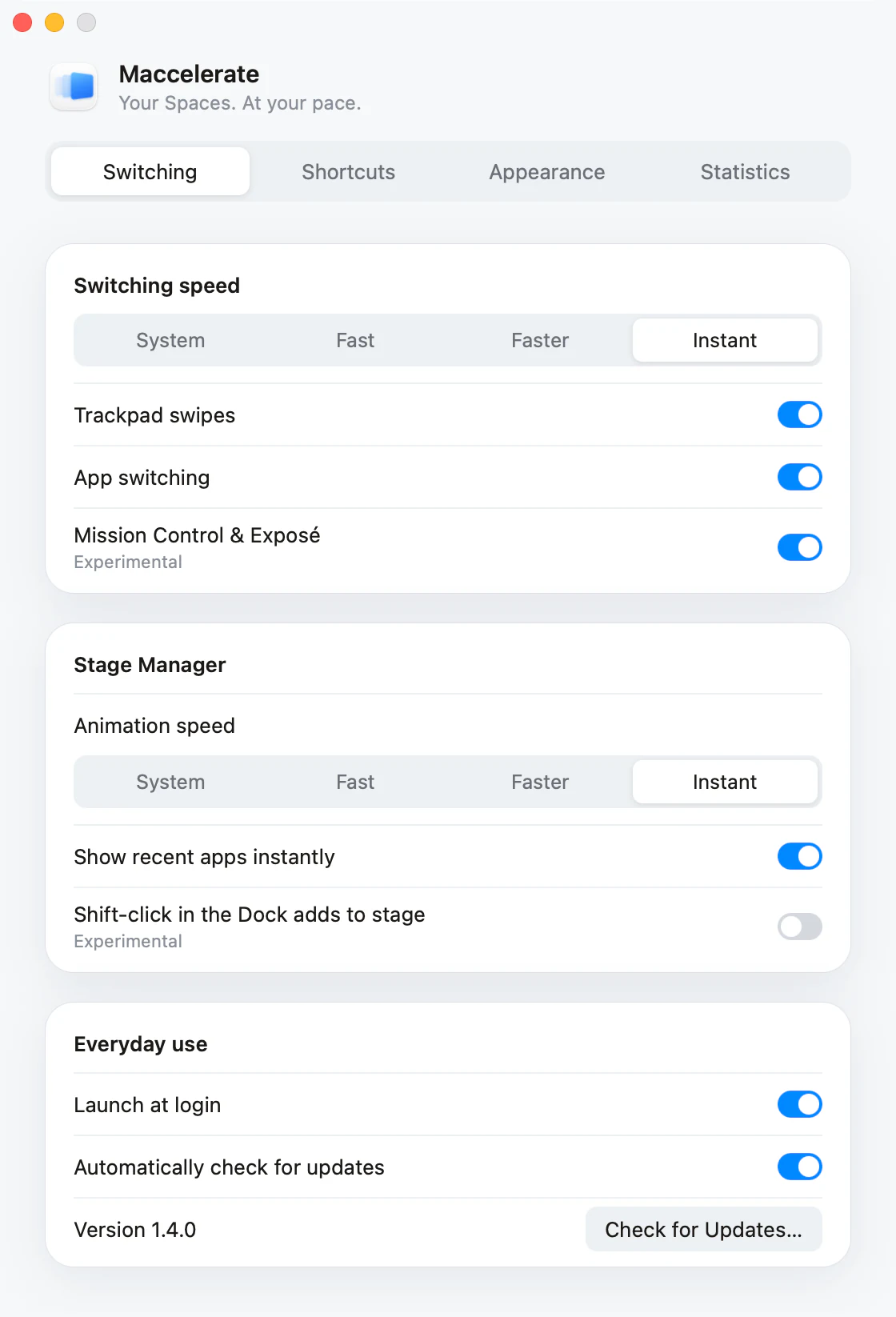
Maccelerate keeps all it does in four tabs. Try them here.
Switching
Pick the pace of every switch.
System keeps the full macOS slide. Fast, Faster and Instant shorten it, whether you switch with the keyboard, the Trackpad or Cmd-Tab.
Shortcuts
Keep your keys. Add your own.
Maccelerate speeds up the shortcuts you set in System Settings. On top, record your own: left, right, the last Space, or straight to Space 1 to 10.
Appearance
Know where you landed.
After a switch, a small indicator shows the Space you arrived in, then fades. Choose its style, its place on the screen and how long it stays.
Statistics
See the time you get back.
A local count of accelerated actions and an estimate of the time saved, by action and by speed. It stays on your Mac.
EVERYTHING INCLUDED
Native Spaces.
Without the wait.
- 01
Native Space switching
Shortcuts, menu bar and trackpad. No SIP changes, no window manager.
- 02
macOS shortcuts, accelerated
Move left or right, Desktop 1–10, Mission Control and App windows, as set in System Settings.
- 03
Additional shortcuts
Your own key combinations as an optional list on top of macOS’s.
- 04
Cmd-Tab
Speeds up the switch when the app you pick lives on another Space.
- 05
Trackpad swipes
Applies your speed to the system swipe gesture.
- 06
Mission Control & App Exposé
Accelerated through shortcuts, menu and gestures. Detection is experimental.
- 07
Stage Manager
Animation speed, recent apps instantly, Shift-click to add to stage.
- 08
Space indicator
The number of your new Space, for as long as you set. Preview it any time.
- 09
Statistics
Local counts by action, estimated time saved, pause and reset.
How it works
Three steps.
Then it’s just there.
Maccelerate lives in your menu bar and keeps native macOS Spaces. There is nothing new to learn.
- 01
Install
Download the DMG and drag Maccelerate to Applications. No account, no license key.
- 02
Allow access once
Grant Accessibility in System Settings and, if macOS asks, Input Monitoring. System Integrity Protection stays on.
- 03
Keep working
Use the shortcuts and swipes you already know. The next Space is there sooner.
Ready to move at your own pace?
Download Maccelerate and switch Spaces without the wait.
- macOS 13 or later
- Accessibility permission required
- Free and open source
GOOD TO KNOW
Clear answers.
Does Maccelerate speed up every animation on my Mac?
It focuses on Space switching, supported Cmd-Tab transitions, Mission Control, App Exposé and the Stage Manager options. It does not accelerate computation or every animation in every app.
Do I need to disable macOS security?
No. System Integrity Protection stays enabled. Maccelerate needs Accessibility access to recognise input and trigger system gestures. macOS may also ask for Input Monitoring.
Will it work on my Mac?
Maccelerate targets macOS 13 and later with builds for Apple Silicon and Intel. Some features rely on undocumented macOS behaviour, so each macOS release needs checking. Mission Control and Exposé detection is experimental.
What happens to my data?
Input and information about apps, windows and Spaces are processed locally. There is no telemetry or crash reporting. Statistics and settings stay on your Mac. Optional update checks contact the official GitHub feed.
Can I keep my existing setup?
Yes. Your native Spaces and the shortcuts you set in macOS stay in place; Maccelerate reads them and does not change them. Cmd-Tab acceleration, the gesture override and the Stage Manager options are all optional.
Are the speeds on this page measured?
No. The demos and the film illustrate the difference with chosen animation durations. Real performance depends on macOS, hardware and settings.